
Appearance#
The signature appearance is controlled entirely by JSON option keys passed to
Atick.signPfx(byte[] pdf, byte[] pfx, String optionsJson). By default ATick shows its logo on the
left, the signer details on the right, and the validity mark.
import io.github.aniketc068.atick.Atick;
import java.nio.file.*;

public class Sign {
    public static void main(String[] args) throws Exception {
        byte[] pdf = Files.readAllBytes(Paths.get("doc.pdf"));
        byte[] pfx = Files.readAllBytes(Paths.get("my.pfx"));

        byte[] signed = Atick.signPfx(pdf, pfx,
            "{\"cn\":\"Aniket Chaturvedi\","   // common name (shown bold after "Digitally Signed by:")
          + "\"org\":\"Acme Corp\","            // organisation line
          + "\"reason\":\"Approved\","          // "Reason: …"
          + "\"location\":\"New Delhi\","       // "Location: …"
          + "\"green_tick\":true}");

        Files.write(Paths.get("signed.pdf"), signed);
    }
}
Long signer names wrap onto more lines instead of shrinking the font, so the box never overflows.
Date / time#
Atick.signPfx(pdf, pfx, "{\"cn\":\"Aniket\"}");                       // current time (default)
Atick.signPfx(pdf, pfx, "{\"cn\":\"Aniket\",\"date\":\"Signed on 10-Jun-2026\"}");  // a fixed string
Atick.signPfx(pdf, pfx, "{\"cn\":\"Aniket\",\"date\":\"\"}");          // no date line
The left side#
The image key controls what is drawn on the left of the appearance:
Atick.signPfx(pdf, pfx, "{\"cn\":\"Aniket\"}");                       // default: the ATick logo
Atick.signPfx(pdf, pfx, "{\"cn\":\"Aniket\",\"image\":\"none\"}");    // no logo
Atick.signPfx(pdf, pfx, "{\"cn\":\"Aniket\",\"image\":\"cn\"}");      // the CN as large text on the LEFT (Adobe-style)
|
Result |
|---|---|
omitted |
the default ATick logo |
|
no logo on the left |
|
the signer name as text on the left instead of a logo |
The validity mark — ATick’s signature look#

The mark sits centred in the appearance and tells the reader the signature’s status at a glance:
Atick.signPfx(pdf, pfx, "{\"cn\":\"Aniket\",\"green_tick\":true}");    // the "?" mark — Adobe paints it GREEN if valid+trusted, RED if invalid
Atick.signPfx(pdf, pfx, "{\"cn\":\"Aniket\",\"always_check\":true}");  // ATick's green-tick graphic as the base (Adobe still reds a bad signature)
Atick.signPfx(pdf, pfx, "{\"cn\":\"Aniket\",\"green_tick\":false}");   // no mark — a plain signature
"green_tick":true— the classic validity mark: a?that Adobe Acrobat repaints green for a valid, trusted signature and red for a broken one."always_check":true— uses ATick’s own green-tick graphic (above) as the base, so the tick shows in every viewer; Adobe still overlays a red mark if the signature is actually invalid."green_tick":false— no mark; a plain signature appearance.
What it looks like#
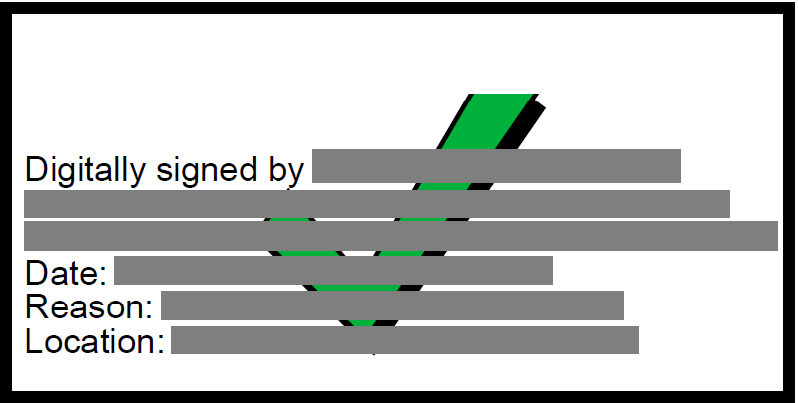
The appearance ATick draws — the signer details with the green tick centred over them:
How Adobe shows it#
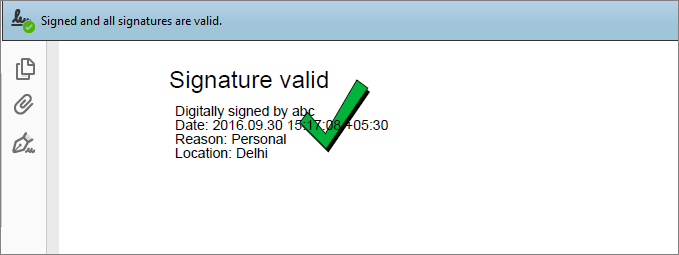
When the certificate is valid and trusted, Adobe Reader / Acrobat reports “Signed and all signatures are valid” and paints the tick green — exactly the reassurance your readers expect:
Every state Adobe can show#
ATick draws the appearance and the mark; Adobe then colours the mark based on the signature’s validity and whether it trusts the certificate, so your reader instantly sees the status:

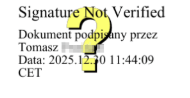
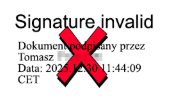
So the green tick appears only when the signature is valid and the signer’s certificate chains to a root Adobe trusts (the Adobe Approved Trust List, or your organisation’s trust). The same ATick appearance shows the question-mark or red-cross state automatically — you don’t draw those; Adobe does.
Colouring the mark#
Colour the mark with a hex string, a CSS colour name, or an [r, g, b] array — or fill it with an
axial gradient:
Atick.signPfx(pdf, pfx, "{\"cn\":\"Aniket\",\"green_tick\":true,\"mark_color\":\"#E53935\"}");        // hex
Atick.signPfx(pdf, pfx, "{\"cn\":\"Aniket\",\"green_tick\":true,\"mark_color\":\"blue\"}");           // CSS name
Atick.signPfx(pdf, pfx, "{\"cn\":\"Aniket\",\"green_tick\":true,\"mark_color\":[255,140,0]}");        // RGB array
Atick.signPfx(pdf, pfx, "{\"cn\":\"Aniket\",\"green_tick\":true,\"mark_gradient\":[\"red\",\"orange\",\"yellow\"]}");  // gradient
Use mark_scale to resize the mark relative to the appearance box.
Distinguished name#
Atick.signPfx(pdf, pfx,
    "{\"cn\":\"Aniket Chaturvedi\",\"dn\":\"CN=Aniket Chaturvedi, O=Personal, C=IN\"}");
The DN is shown directly under the “Digitally Signed by:” line.
Custom-text-only appearance#
Show only your own text — no “Signed by”, no date, no CN structure. Inside body, \n starts a
new line and *word* makes that run bold. Because the value lives in a JSON string in Java
source, escape each line break as \\n:
Atick.signPfx(pdf, pfx,
    "{\"body\":\"*APPROVED*\\nReviewed by: *Aniket Chaturvedi*\\nThis document is *legally binding*.\"}");
Note
In Java source \\n produces the two characters \n in the JSON string, which ATick reads as a
line break. A literal Java newline would break the JSON.
Positioning the appearance#
Place the appearance with page + rect, or stamp several positions at once with placements.
Coordinates are PDF points as [x1, y1, x2, y2].
Atick.signPfx(pdf, pfx,
    "{\"cn\":\"Aniket\",\"green_tick\":true,\"page\":1,\"rect\":[300,55,575,175]}");

// one stamp per entry: [page, [x1,y1,x2,y2]]
Atick.signPfx(pdf, pfx,
    "{\"cn\":\"Aniket\",\"green_tick\":true,\"placements\":[[1,[300,55,575,175]],[2,[300,55,575,175]]]}");
You can also size the box directly with width and height.
Invisible signature#
A cryptographically valid signature that draws nothing on the page — pass an empty placements
array:
Atick.signPfx(pdf, pfx, "{\"cn\":\"Aniket\",\"placements\":[]}"); // empty placements
Other appearance options#
Key |
Purpose |
|---|---|
|
the heading line at the top of the appearance |
|
extra free text line |
|
organisational-unit line |
|
size of the appearance text |
|
colour of the text |
|
background fill of the box |
|
draw a border around the box |
|
the box size |
|
scale factor for the validity mark |
Errors#
Every failure throws Atick.AtickException:
try {
    Atick.signPfx(pdf, pfx, "{\"cn\":\"Aniket\",\"image\":\"missing.png\"}");
} catch (Atick.AtickException e) {
    System.out.println("signing failed: " + e.getMessage());
}